New connection
Understand your electricity consumption in detail by period From our private area, you can view and download your electricity consumption data online, simply and securely.

Before you begin
To make the request, you need to:
- Have an active user account on our private website.
- Log in to the private area with your credentials.
Where to submit your request
Once inside the private area, start the procedure under:
Grid Connection → New supply or supply modification request
How does the process work?
The procedure is carried out online and follows these steps:
- Initial request
Fill in the online form with the installation details. - Technical review
We analyse the viability of the supply, the requested capacity, the plans, and the location. - Technical and economic proposal
We will send you the technical conditions, the estimate, and the execution timeframes. - Acceptance and payment
You accept the proposal and make the corresponding payment. - Execution of works
We carry out the necessary installations for the connection. - Supply registration
We generate the CUPS (Universal Supply Point Code).
With this code, you can set up an electricity contract with the supplier of your choice.
When can you request a connection?
You can complete this procedure in the following cases:
- New supply
If the property or premises has never had electricity, or if an existing space has been divided. - Capacity upgrade or voltage change
If you already have a grid connection but need more capacity or a voltage change.
This also applies if the supply has been disconnected for more than 3 years. - Short-term supply
For specific events such as fairs or travelling installations. - Builder's temporary supply
If you need electricity during construction work. - Complementary or safety supply
If you need a second supply for safety reasons, such as a backup supply
Register in the private area to request a new connection.
Already registered? Log in.
Download the necessary documentation that will facilitate the process of managing connection requests.
-
Management guide for supplies with e-distribution
Guide for managing new supplies and extensions to existing ones
-
Network connection management manual
This manual provides you with all the information you need to manage network connections in private areas.
-
Technical report on installations (example of report template)
Download the technical report template
- How can I request a new connection with e distribución?
- What details must I provide?
- What documentation do I need for the request?
-
What features does the private area offer for managing connections?
-
The Private Area allows you to:
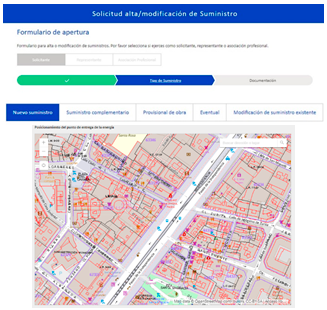
Register requests online
- New supplies and capacity upgrades.
- Builder's temporary, short-term, and complementary supplies (backup).
- Modification of existing supplies.
- Generation and self-consumption requests.
- Map positioning of the delivery point.
- Obtaining the request code upon completing the form.
Tracking requests
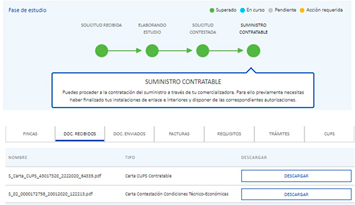
- Real-time status checks of your request.
- Access to all sent and received documentation.
- Submission of additional documentation during processing.
- Information on the steps required until the CUPS are ready for a supply contract.
Web payment gateway
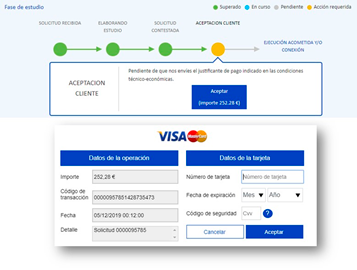
- Acceptance of technical and economic conditions.
- Secure payment via bank card or Bizum.
- Invoice download once payment is made.
- Alternative access to the banking gateway via the link included in the technical and economic conditions.
-
-
What should I keep in mind when opening a supply request?
-
First, you must select the request type from the following options:
- New supply.
- Modification of existing supply.
- Builder's temporary supply.
- Short-term supply.
- Complementary supply.

You will then need to answer the following questions:

Next, you must:
- Provide the property address:
- In urban areas: postal address and, if necessary, an explanatory field.
- In rural areas: cadastral polygon and plot.
- Pinpoint the energy delivery point on the map (new or existing General Protection Box).
- Select or create the corresponding property:
- New property in the street directory: for new buildings, construction sites, short-term supplies, or plot segregations.
- Existing property: for new supplies in existing premises or modifications to already registered supplies.

If your request involves a new property, a new supply on a public road, a construction supply, temporary, complementary, or results from splitting an existing plot, click “New property on street”.
If your request involves a new supply in an existing property (new commercial premises, elevator installation, etc.) or modification of an existing supply, select the property from those shown by clicking “Select.” We will display all its consumption points, identified by address and voltage. If the request is for one of them, click “Select” on the supply point. Otherwise, click “New consumption point in selected property.”
Depending on the case, you must:
- Define the technical characteristics of the request.
- Indicate the use and details of the property.
- Provide details of all future supply points, including their voltage and capacity.
- Create as many property profiles as there are distinct cadastral references in the request.
- Add relevant remarks and select whether or not you require an assessment for a new network extension.
Finally, you must attach the required documentation. Once the process is finished, you will be provided with a request code, which you can use to track it.
-
- What tracking information is available in the Private Area?
-
What additional information is available when tracking my processed connection requests?
-
In the existing tabs located at the bottom of the request tracking page, you will find information regarding your request.

-
-
Can I make enquiries about my request?
-
Yes. Using the 'Submit an enquiry' button, you can ask any questions related to your ongoing request.

Answers will be notified by email and recorded in the enquiry history of each request.
-
- Can I cancel an ongoing connection request?
- How can I accept the conditions of my request?
If you would like to know in detail how to submit a new application for supply registration with us, watch this video.
En este vídeo te mostramos de forma sencilla y rápida cómo solicitar un nuevo suministro eléctrico o modificar uno ya existente.